iMprOVE_WRAP 2.2 released

iMprOVE_WRAP 2.2 has been released.

I’ve added two new GML functions to the asset: iw_point_distance() and iw_point_direction(). These functions work much like the built-in GML functions point_distance() and point_direction(), except they take into account the iMprOVE_WRAP wrap region.

Release Notes

Version Notes
2.2 New functions:

  • iw_point_distance(): returns the shortest distance between two points, taking into account the wrap zone.
  • iw_point_direction(): returns the direction of the shortest distance between two points, taking into account the wrap zone.

Get iMprOVE_WRAP

GameMaker Marketplace

itch.io

Full Documentation

iMprOVE_WRAP 2.1 released

iMprOVE_WRAP 2.1 has been released. Get it at GameMaker Marketplace or itch.io.

Full Documentation.

Release Notes:

1.0 Initial release
1.0.1 Updated iw_draw_self_wrap() to use image_blend rather than c_white for the color argument.
2.0.0 Added new functions:

  • iw_draw_sprite_wrap(): an iMprOVE_WRAP version of draw_sprite()
  • iw_draw_sprite_ext_wrap(): an iMprOVE_WRAP version of draw_sprite_ext()

Improvements:

  • Boundary drawing now occurs at wrap corners as well.
  • Phantom collison checking also occurs at wrap corners.
  • iw_collision_wrap() and iw_collision_wrap_map() functions now incorporate do_wrap_h and do_wrap_v arguments, and only perform collision checks where they are needed. They still return a value for all locations, but where no check is needed, they return noone.
2.0.1 Improvements:

  • iMprOVE_WRAP demo resources have been placed in folders to keep them tidy when importing the asset into a project.
  • oIMprOVE_WRAP_demo sprite has been updated to allow for more precise positioning. Sprite is semi-transparent, with a yellow pixel at the origin
  • oIMprOVE_WRAP_demo object now draws guide lines indicating the height and width of the wrap range. This is useful in confirming that clone drawings and wrapping is occuring where it should.
  • iMprOVE_WRAP demo dashboard text has been updated to be a bit more clear
2.1 New functions:

  • iw_distance_to_object(): returns the shortest distance to the target object from the wrapping object, taking into account all directions available.
  • iw_distance_to_point(): returns the shortest distance to the target point from the wrapping object, taking into account all directions available.

New demo room for the iw_distance_to_object() and iw_distance_to_point() functions


YoYoGames seeks beta testers for OS X GMS2 

I don’t have a Mac, but I sure want GMS2 to be a first rate product on OS X.

It’d be great if they could someday announce a Linux port of their IDE as well. I’ll never give up dreaming. 

Sign up for the OS X GMS2 Beta:

​https://www.yoyogames.com/blog/414

N-Key Quest

It appears that a major obstacle to getting laptop makers to provide better keyboards is getting them to understand what properties matter to users.

I’m just one small person, but I am trying to raise awareness of key rollover and why it matters to laptop users.

A while ago, I had a chat with Lenovo Support. I had noticed that they had added an additional keyboard option to the P-series ThinkPads, and was hoping (though not holding my breath) that it might mean the new keyboard SKU would be for a model with acceptable rollover. Spoiler: The new keyboard option is for backlit or non-backlit keyboard, but they appear to have the same, poor, unacceptable key rollover characteristics as when I purchased my P50 last March.

But at first when I discussed with Lenovo Sales Support, they didn’t even understand what rollover is. I guess that’s not terribly uncommon; it’s a geek thing. But when your customers are geeks, it’s important to be able to speak about things they are concerned with, understand those concerns, and care about them.

Sales Rep: Hello, thanks for contacting Lenovo. My name is Quentin E.. I am reviewing your information now.

Me: Hi Quentin

Sales Rep: Hello, my name is Quentin with Lenovo Sales REP ID# #2900723431, at the end of this chat there will be a short survey that will pop up, Survey ranges from 1-9 and 9 being the highest, if you don’t mind taking a second to let my managers know how I am doing.

Sales Rep: I will be more than happy to assist with your purchase today

Me: I have a question about the ThinkPad P50. Last spring, I bought a P50, and at the time there was only one option for the keyboard. I see now that you are offering the choice of a backlit keyboard.

Me: I am very satisfied with my purchase overall, but with the keyboard I was very disappointed that it does not support N-key rollover.

Me: I am wondering what the key rollover property of the current keyboard offerings is?

Sales Rep: Are you looking to purchase an new keyboard today?

Me: potentially, if it offers improved key rollover to my current keyboard.

Me: are you familiar with what key rollover is?

Me: https://en.wikipedia.org/wiki/Rollover_(key)

Sales Rep: No I am not familiar

Me: that article will explain; it is the ability of the keyboard to register multiple simultaneous key strokes

Sales Rep: Are you interested in wireless keyboard ?

Me: I am a video game developer, and I have found that for my work in programming and testing video games that I make, the built-in keyboard does not reliably catch key strokes when more than 2 keys are pressed down at the same time. I’m forced to use an external USB keyboard if I am testing games. But I would like to replace the built-in keyboard with a keyboard that can hadnle multiple keystrokes, if that were a possibility.

Me: i’m not interested in a wireless keyboard, to answer your question.

Sales Rep: http://shop.lenovo.com/SEUILibrary/controller/e/web/LenovoPortal/en_US/catalog.workflow:item.detail?hide_menu_area=true&GroupID=460&Code=0B47190

Me: Like I said, I’m currently using an external keyboard, since the built-in keyboard doesn’t support N-key rollover…

Me: I’m just trying to find out whether there are any replacement keyboards available for the P50 that support higher key rollover. i’d prefer N-key, but 5 or 6 key rollover would be a major improvement.

Sales Rep: This is the only keyboard option for the P50

Sales Rep: other than the wireless keyboard

Me: I am seeing that there is an option for a backlit keyboard on the P50 — I don’t recall that being available when I ordered mine. If you could tell me what the key rollover property is for your offerings, it would be very helpful.

Sales Rep: can you provide the part number

Me: I’m looking, but i don’t see the part number. In the “configure to order” options for the P50, I see two options now: “Keybaord with Number Pad – English” and “Backlit Keyboard with Number Pad – English”

Me: and under help me decide it says this:

Me: Lenovo has refreshed the keyset on all ThinkPad laptops, outfitting them with the ThinkPad Precision Keyboard.

Me: This new keyset allows a more comfortable, fluid and accurate typing experience with it’s slate of individually rounded, spacious, and low-set keys. The ThinkPad Precision Keyboard simultaneously delivers a modern look and feel to your ThinkPad.

Sales Rep: That is only an option when config

Me: So I am wondering if this means that they have improved the key rollover property of these refreshed keyboards

Me: Surely the keyboard is an FRU that can be ordered? I would be interested to do so if you could tell me the key rollover.

Sales Rep: You can contact the parts department for additional information keyboard

Sales Rep: 855-253-6686 op 4

Me: ok.

Me: would you be able to pass feedback along to the system engineers who design the ThinkPad line, to let them know that this is an important characteristic?

Me: I would be willing to pay as much as $100 extra for a keyboard that supports N-key rollover, it is essential for my work.

Sales Rep: You can give the information to the parts department also

Me: ok

Me: this matters a great deal to me. As a satisfied user of the T-61 model, I felt it had the best built-in keyboard of any laptop I’ve ever used.

Me: I even wrote a detailed article on why it is the best.

Me: https://csanyk.com/2015/06/the-best-laptop-keyboard-yet-devised-by-humankind/

Me: It is one of the most popular articles on my blog.

Me: I will mention this to the parts dept as well.

Me: does the parts dept have a web chat feature or or email? or just phone number to reach them?

Please wait while we transfer your chat to the next available agent.

Service Agent is your new agent for the chat session.

Customer Service Rep: Hello, thanks for contacting Lenovo. My name is Mikella T.. I am reviewing your information now.

Me: hi…

Me: i was chatting with Quentin a moment ago, and then I guess he transferred me to you. Are you in parts?

Customer Service Rep: Hello Chris

Me: hi

Me: are you able to see my questions?

Customer Service Rep: Are you trying to reach the parts department

Me: Not really. I am just trying to get an answer to a question about the characteristics of the built-in keyboard for the ThinkPad P50.

Me: in the “customization” options for this model, it says “Lenovo has refreshed the keyset on all ThinkPad laptops, outfitting them with the ThinkPad Precision Keyboard.

Me: This new keyset allows a more comfortable, fluid and accurate typing experience with it’s slate of individually rounded, spacious, and low-set keys. The ThinkPad Precision Keyboard simultaneously delivers a modern look and feel to your ThinkPad.”

Me: I purchased a P50 last year, and at the time there was no option; I’m now seeing an optional backlit keyboard, and the description above suggests that the keyboards you’re shipping now may be different from what were shipped a year ago.

Me: so I am interested to learn the “key rollover” property of the currently offered keyboards

Me: my P50 does not register keystrokes if I have more than 2 keys pressed simultaneously (it may or may not register a third keystroke at that point). This makes it a poor keyboard for playing games. I am a game developer, so spend a lot of time testing games that I am making.

Customer Service Rep: Ok , so we are not the appropriate department for that

Me: so if the keyboards now offered have improved rollover, i would be interested to purchase and replace the one that i have.

Customer Service Rep: Perhaps the number provided by sales can assist you with that inquiry

Customer Service Rep: As this is customer support

Me: Quentin did give me the number for parts, but only a phone number. it is better for me if i could use chat or email to reach them. is that possible?

Customer Service Rep: Sorry that is the only contact information that we have

Me: ok what was the number again?

Customer Service Rep: 855-253-6686 op 4

Me: ok thank you.

I give them credit for trying. Normally their sales support people are very helpful and can provide detailed information, but it doesn’t seem like anyone at Lenovo have bothered to document their keyboards rollover characteristic, as though they don’t care or aren’t even aware that rollover is a thing.

I did call the number the Customer Service Rep gave me, but it didn’t get me anywhere. Their technical people still could not answer the question.

I suppose I could try ordering one of the new “ThinkPad Precision” keyboards (with a name that has Precision in it, you’d really hope that it would mean that the keyboard is capable of detecting precisely which keys are down at any given time, no matter which or how many.)

Perhaps I will stop by a local computer store and test out their ThinkPads to see if their keyboards are registering new keystrokes.

Seems like a pretty long shot….

Even so, I hope my fellow keyboard geeks can raise their voices and make themselves heard. If Lenovo gets enough feedback from users, I think it could make a difference in their future offerings.
GameMaker Studio 2.0 officially released, no longer in Beta

Yesterday, YoYoGames announced that GameMaker Studio 2.0 is out of beta.

Perhaps not coincidentally, I’ve noticed a bit of an uptick in purchases of my assets on the GameMaker Marketplace in recent days.

I have not yet updated any of my Marketplace assets for GMS2, but I believe that most of them should still work, although they may require the use of compatibility scripts generated by GMS2 on import in order to run in GMS2.

If you happen to have downloaded any of my assets, and find an issue with it, I am easy to reach for technical support.

The best way to reach me would be to send a message through the asset page on the GameMaker Marketplace. My email address is also in the documentation for the asset. And you can also reach me via the Contact page on this website.

Thoughts on the Nintendo Switch now that it’s out

Nintendo Switch is out. I still haven’t bought one. Wasn’t planning to right away, as I’m habitually not an early adopter when it comes to game consoles. Here’s my thoughts anyway.

After reading reviews for Legend of Zelda: Breath of the Wild I figured I would definitely buy a Switch. Before, I wasn’t entirely sure. I’m very intrigued to give it a play. One thing that worries me is the fact that your equipment wears out and breaks. I think that has potential for an under-utilized play mechanic, but on the other hand I think it’s a design choice that runs the risk of turning the game into a never-ending grind fest to keep up maintenance on your kit, and I don’t necessarily like the feeling of being on a treadmill.

I never bought a Wii U, either, and I still have yet to hear an announcement that Super Mario Maker will be coming to the Switch, which is insane. How can they not bring SMM to the Switch? It has to happen, right? Only, I’ve heard nothing. Since LoZ:BotW is also on the Wii U, maybe I should just buy a Wii U on clearance, save money, and enjoy both games?

But there are a few other interesting new titles that will be coming out on Switch in the near future, like Blaster Master Zero, which looks like a phenomenal remake of the original.

I was at GameStop earlier today, and to my surprise they actually had the Switch and accessories in stock. I looked at them, but didn’t buy. I’m put off by reports that there are reliability issues with the right-JoyCon control. When it comes to game consoles, I am almost never an early adopter, and stuff like this are a chief reason why. But I am also struck by how absolutely tiny the controls are for the Switch. I understand the console needs to be small enough to be portable, and I read that the controls are small, but in person they’re still shockingly small, even forewarned. I haven’t actually held one to see how they feel in the hand, but my initial impression is, “Geez, I sure hope they come out with an adult-sized JoyCon pair.” But I’m doubtful this will come to pass.

I also just heard that game saves aren’t transferable between Switch consoles, which is pretty lame. I hope that Nintendo rectify this, and allow game saves to follow a user’s account, or even be shared between user accounts so that friends can send each other game saves.

Update 3/07/2017

I’m back to undecided on the Switch.

Early reports from users suggest that the Switch hardware has a number of issues that are simply not acceptable. I believe these issues are addressable, but Nintendo really needed a flawless launch if they wanted to have a hope of recapturing the marketshare that they lost due to the unpopularity of the Wii U.

Joy-con connectivity failures, attributable to how the devices were designed and/or assembled. Potentially fixable by re-routing some wires inside the controller, or by using a bit of soldering know-how. But really this is a warranty problem, plain and simple. These are defects that Nintendo should own responsibility for, and fix for free.

Dead pixels on the handheld screen. Maybe I shouldn’t care about this very much, since my main use of Switch would be as a TV console, but Nintendo’s policy is that dead pixels are a normal property of LCD displays, and that they don’t fix them because they don’t consider them to be broken. WTF, Nintendo.

The more I think about it, the more I wish the Switch weren’t trying so hard to be innovative. I think what Nintendo did to make it a viable console/handheld hybrid is amazing, but I think the result of hybridization is compromise. Switch compromises as a console because it lacks the processing power that full consoles like the PS4 and XBox1 have. It compromises as a handheld because of it’s somewhat inconvenient size and relatively short battery life.

That means that the only innovation left is with the joy-con. And while they do have some of the most clever design aspects we’ve seen on a controller to date, such as the HD rumble, their multi-use, multiple configuration design, and being packed with features, here too are compromises. The joy-con are tiny and not necessarily the best in ergonomics. And they have some reliability issues that Nintendo simply must address quickly and completely.

For what I would personally want out of a next-gen Nintendo console, it would be to be able to play games like Legend of Zelda: Breath of the Wild, at full 1080p, or even 4K resolution, with a good, full-size controller like the Switch’s pro controller. I’m very unlikely to take advantage of the portable/handheld aspect of the Switch, nor am I very likely to use Switch as a party/social game platform. I do think it’s cool that Nintendo are thinking about such use cases, but they are simply not use cases that I see myself doing much, if at all.

I find myself wondering what hackers like Ben Heckendorn will do with the Switch. Ben Heck has made himself into a minor celebrity over the last 10 years or so, by doing ingenious hacks of old gen consoles, minifying and re-building them into portable/handhelds. These are very cool projects, but the Switch already gives us this. Nintendo appeared to have beaten Ben Heck at his own game. Or have they? Perhaps a hacker like Ben will hack the portability out of a Switch, and add hardware to it — a beefier CPU, GPU, more RAM, improved cooling and overclocking, turning it into a more serious current-gen console system, to allow Breath of the Wild to run without slowdown.

That would be an interesting and worthy project.

YoYoGames announces license portability for GMS2

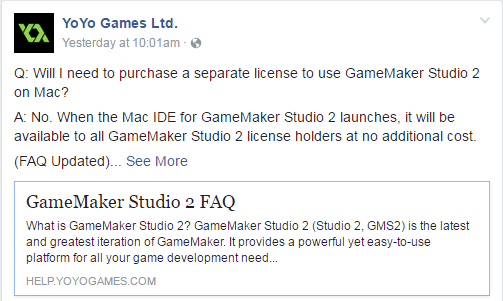
YoYoGames have announced in an update to their GameMaker Studio 2 FAQ that the beta for GMS2 for Mac OS X will be coming out in the near future. No exact date has been given yet. But their announcement also mentions that the Mac edition will be available to users of GMS2 who have already purchased a license for the Windows edition, at no extra charge. In other words, purchasing a license will entitle you to run GMS2 on whichever platform you prefer, and you don’t need to decide that at purchase time, and you can change your mind at any time, or even switch between OS X and Windows boxes.

GMS2: License FAQ

This seems to align with the GMS2 license model, which ties your GMS2 license to your YoYo Account, not your computer.

I think this is great for longtime users who wish to get off of Windows PCs, and are willing to switch to Mac. I only wish that YoYoGames had plans to port GMS2 to Linux, as had briefly been floated back in 2014.

Nintendo announces Switch launch date, price

Yesterday, Nintendo had their big announcement about their new console, Switch. It will be $299 on March 3, region free, online play will be paid, launch titles have been announced. The Joy-con controllers are more sophisticated than initially shown in the teaser video Nintendo released a few months ago. Joy-con have motion control and “HD” vibration features, and even a camera on the right side. Onboard there’s only 32GB of storage, which is expandable with SDHC the built-in screen is “only” 720p (which to be fair is plenty on a handheld screen, and should help with battery life to a degree) but does support touch.

The new Zelda title looks amazing. New Zeldas always do, but this one really does look very impressive. The new Mario looks a bit weird, like they put Mario in a GTA world, or that Halloween episode of the Simpsons from years ago, where Homer went through some dimensional warp and ended up in the 3D world. But also amazing. It won’t be out until later this year, unfortunately. There will be other sequels — surprised? Splatoon 2 is happening, as expected. Mario Kart 8 is being revised somehow and brought along for the Switch. Surprisingly, no word on whether Super Mario Maker is going to be ported as well. It really should be.

The biggest criticisms of the announced launch titles are how few they are, and that not enough Big Names have been announced. It seems Nintendo may be playing a game to maximize sales by spacing out their major releases so that each gets full attention.

I have some new questions. Because the Switch hardware is so reconfigurable and flexible, how will games adapt to it? Will Switch games be designed with the intent that the Switch be in one particular configuration in order to play them? Or will they have multiple modes, which can be played depending on which configuration you have your Switch in at the moment? I imagine it will probably be a bit of both. Although, if it drives costs up to make the software flexible enough to handle whichever mode the Switch is currently in, that could end up backfiring as developers target one specific mode only per title. How will supporting all of these different modes with one game work for developers?

There’s been a certain amount of WTF and ridicule following the announcement among Nintendo naysayers. Accessories for the Switch seem to be pricey. Over the last few months, since the initial announcement, there’s been a considerable amount of second-guessing among gamers. Initially the Switch seemed very exciting and innovative, a do-it-all, go-anywhere console with loads of innovative features and potential, but that initial impression wore off quickly as gamers wondered just how good the graphics and battery life would be, and what sort of capability the hardware would have relative to the competition.

Does Switch offer enough to get me to buy one? Maybe… Zelda: Breath of the Wild is the most attractive draw to the new console for me, by far. If they had Super Mario Maker, and maybe a new 2D Metroid game, that might be all it takes for me to put it on my want list. Hmm, how about a Super Metroid Maker? Or Mega Man Maker? Or literally any 8-bit franchise maker for that matter? I’d buy Switch in a heartbeat if they had something like that in the works. The small number of titles at launch isn’t that small, although the number of games that actually interest me is.

That’s a concern, but I’ve rarely been an early adopter when it comes to videogame consoles. My first console, the Atari 2600 had been out for several years before I was old enough that my parents bought one. I had no input into that decision, but it was a happy one. I think we got our NES in 1987, after a year of the Atari 7800, maybe we got a SNES the year it came out, the N64 came out when I was in college and my brother had one but I didn’t play it all that much compared to when I had free time.

I wouldn’t have bought myself a GameCube, which came out when I was probably the least interested in videogames that I’ve ever been in my life, but I received one for Christmas one year, 2002 or 03, I think, and didn’t buy a Wii until they stopped instantly selling out of stores…

I still haven’t, and likely won’t, buy a Wii U, ever, despite how much I’d like to play with Mario Maker.

And while I thought the Switch had an exciting design when I saw the trailer video for it a few months ago, I don’t feel all that excited about it. It’s capability as a mobile game platform doesn’t do anything for me — I’ve never been into mobile gaming. Its reconfigurable controllers are clever, but I don’t know that they truly offer anything new. And the multiplayer aspect, which seems to be another big part of Switch’s appeal, doesn’t do much for me, because I’ve always been more of a solitary gamer. For much the same reason, I haven’t been very into network games, either.

I just haven’t found much compelling about AAA games, really, for many years. A few exceptions, to be sure, but probably not even 1/year. I’m pretty deeply rooted in the old school, you might say. These days, I’m much more into retro-styled indie games, like Shovel Knight, Hyper Light Drifter, and Daniel Linssen’s brilliant Ludum Dare platformers, and classic 8- and 16-bit era games.

These days, I find I just don’t care as much for 3D games, analog joysticks, and voice acting and cutscenes in videogames. These things can be done well, but are so hard to do well, and age so poorly, compared to 2D games with low-res graphics, which seem timeless. Truthfully, most modern 3D games either feel crude and lacking in polish, or else cookie-cutter affairs lacking in soul, offering little that their predecessor didn’t also.

As such, I don’t feel that Switch is necessarily aimed at me. That’s fine. I’m pretty niche in my interests, and am served well by my existing library, as well as by the indie market. And I don’t know that that’s a miss on Nintendo’s part. I expect that if the exclusive titles are there, Switch will be a hit. But if Nintendo don’t get a lot of great first-party hits, and attract a strong lineup of 3rd party developers to release games on their platform, it could be a repeat of the Wii U.

I fully admit I know nothing about videogames as a business. I really liked the Ouya, and I still do. Time will tell.

Getting ready for Game Jam Weekend, part 2

Take inventory

Ahead of the weekend, it’s good to take a personal inventory. Conceptually, I like to break this into three main areas: Skills, Tools, and Supplies.

Skills

Skills are your personal abilities, your strengths that you will bring to the project. Are you a good designer of rules and systems? A good programmer? Visual artist? Audio designer? If you don’t really know what your strengths are, it’s time to reflect on what your capabilities are, and think about how they might be applied to the project. Even if you think you know what you’re good at, or what you’re going to be doing, it’s good to review everything you know how to do, just in case you might have overlooked something or taken it for granted.

Really, just about any skill can be useful in game development. It’s not just design, programming, art, audio, and project management. Things like math, physics, psychology, humor, and acting are all important skills that have obvious application to different parts of game development. Be open minded and creative, and ask your friends what they think you’re good at or what your strengths are. You might be surprised by what they see, that you wouldn’t have thought of.

Tools

What are you working with? If it’s equipment, get it all together before jam weekend and make sure it’s in good working order, that any cables or accessories that you need are not lost, and so on. Musical instruments, microphones, game controllers, and any other hardware that you can think of should be on a list, and packed up ahead of the Jam weekened. Do you need batteries? Are they charged? Do you have enough of them?

If it’s software, check for updates and make sure it’s installed and launches, that the license is activated, and so on.

Are there other things you can set up ahead of time, like your version control repository, project website, mailing lists, etc? Get it together ahead of time.

Supplies

Supplies are things that you’re going to need for the weekend that are consumable. Things like food, sleeping bag/blanket and pillow, toilet paper, etc. Or things like paper, pens/pencils/markers, and post-it notes. Or game pieces like dice, pawns, cards, and so on.

Make a list, and get everything together ahead of time. If you’re running around last minute, you’re going to forget something, and at the very least you’ll be more stressed out than you would be otherwise. Preparing everything ahead of time means you can relax, clear your mind, and focus on having a productive weekend.

Set goals

Although I said in my previous article that you should approach your physioligical preparation for Jam Weekend like you’re gearing up for an intense athletic competition, a Game Jam really isn’t a competition. The experience is what matters, not just the outcome. Failing is fine! It’s only a weekend, and part of the reason it’s only a weekend is to set the stakes low enough to allow you to take risks. So take them! Do something that might not work, or that you’re not good at, or that you haven’t tried before.

My first Global Game Jam, I wanted to simply complete a project in a weekend that was playable. I didn’t care how good or bad it was, although obviously I wanted to put my best effort into the project, and did. But my main goal was to have something to show for the weekend that I could call “finished” and show to others. That was a fine goal to have.

But there are other goals that you could have. And it’s entirely up to you what those are. Just think about them, and let them guide you. Your goal could be to work with or learn about a specific tool or technique that you have never used before. Or you could make your goal be to make the best game you know how to make, and so focus on execution rather than learning or experimentation, sticking with what you know and what you do well, and simply be as productive at what you’re already good at as you possibly can.

Your goal could be to focus on team work and collaboration, or on being a good project planner/coordinator. Or your goal could be to have a good time, or to ensure that someone else has a good time with their first jam experience, by creating a positive atmosphere and giving encouragement. Maybe your goal is just to find out whether this is something you can really do.

There are many, many dimensions to a game jam, and you can set goals respective to any of them. It doesn’t matter what your goals are, it matters that you have them.

Teaming

I see basically three approaches to participating on a project: solo, on a team, or as a freelancer.

Solo developers, do everything for their project themselves. This works well if you’re well rounded enough in your skills inventory to handle everything yourself. But most people are strongest in one or two skill areas, and are weaker or nonexistent in other areas. It can be limiting to work alone, or it can be liberating. But it all falls to you.

A Freelancer is a jammer who focuses on a particular skill, and provides services to as many teams as need it. This often works well for musicians or artists. Rather than remaining a dedicated resource for a single team, they will work on several projects. This keeps them busier than they might otherwise be. Oftentimes the artists are idle in the early stages of a project, prior to the game design being at a point where it’s ready for the artists to start working on things. And often they can finish the assets for a game quickly, and then have little else to do, and so are able to provide assistance to other projects.

Teams are when a group of people work together on a project. If you’re teaming, either you’re aware ahead of time who you plan to work with, or you’re not.

If you know your team members ahead of time, that’s great, because you can plan and coordinate and prepare ahead of the jam. Just knowing what your capabilities and skill levels are helps, but it’s also good to know what your goals and tastes are. Get together and go over your skill and tool inventories and figure out what your team’s strengths, weaknesses, goals, and interests are.

Get an idea of what role each team member will play, and then each team member can focus their preparation more narrowly in support of that role. If you have more than one programmer, make sure they’re on the same version of the tools that you’re using, and that you all have access to the version control repository that you’re using. Pre-jam is a great time to do stuff like set up your web site, your version control repository, Trello boards, Slack channels, and so on. Make sure that everyone on the team has access to any common tools that they will need to function on the team, and that they have at least some familiarity with them.

If you don’t know who you’ll be working with, and just go into the weekend intending to work with whomever has an interesting project and needs help, you can still prepare by getting to know the people who’re going to be at your jam site ahead of time. Make friends, and see who you might feel like you can work well with.

You can also prepare inwardly, too, and work on your presentation skills, and social skills. Practice pitching ideas, focusing on being brief, interesting, and persuasive. It can be hard to articulate ideas and explain them to other people, but practicing doing that can help.

A good exercise is to think of a game that is familiar to you and that you like, and describe it in less than a minute to someone who has never seen the game before in a way that would give them an understanding of the game and make them want to play it. Or focus on one aspect of a game and explain why it is successful at what it does. Being able to clearly describe a thing that does not yet exist is a critical skill in the early stages of developing a game. If you can do this clearly, succinctly, and compellingly, it’s more likely that you’ll be able to get others on board and aligned with your ideas.

It’s equally important to be good at listening to the good ideas of others, and to be able to negotiate compromises. Think about what it means to be a good listener, a good mediator, and a good conflict resolver and problem solver.

Another critical skill for teaming is managing the team and the project. How do you keep everyone on track, keep tabs on what each member is working on, and ensure that what they’re working on will integrate with the other pieces the team is working on? Communications should be ongoing throughout the weekend, with frequent check-ins to report status, verify that everyone understands what is needed and who’s responsible for it. How do you like to hear feedback? How can you help someone to understand what you’re telling them when they’re not clear?

In short, think about all the interpersonal dynamics of working with others, and ask yourself what kind of person would you want to work with. Remember that when you’re working with your team, and be that person! Thinking about it ahead of time will help you hit the mark, and avoid getting caught up in being short sighted in the moment.

Getting ready for Game Jam Weekend, part 1

Global Game Jam 2017 is coming up soon. I’ve been talking with my fellow game developer friends about how to prepare. It seems like a good topic for a blog post or two.

Preparing mind and body for the game jam

In this article, we’ll cover the mental and physical preparation you should think about doing ahead of time, and during the weekend, to maximize your performance and your potential.

Approach Jam Weekend like you’re getting ready for a major athletic competition.

(Normally this means a season’s worth of training on specific skills and physical conditioning, but we only have a few days, so I’m going to skip that part of it. It is what it is.)

A game jam is more a mental activity than a physical one, but the same ideas apply. Just as you would prepare for a chess or poker tournament, or a triathlon or ultra-marathon, you should strive to enter Jam Weekend at your peak. That means healthy, well rested, energized, and in top condition.

Be well rested and well nourished. Jamming for a whole weekend is seriously taxing on the mind, and the brain needs energy and rest, just as the body does.

Sleep

DO count on getting good sleep during the weekend.

Some people will stay up all weekend, but I don’t recommend it. You’re more productive when you’ve gotten adequate rest. If you can’t sleep well at the Jam site, and it’s pretty unlikely — there’s a lot of noise and chaos and activity going on at all hours — I recommend going somewhere you can get good sleep when it’s time, and if that means off-site, then so be it.

“Crunch time” is a common anti-pattern in software and game development, and is almost always unnecessary and detrimental in the long run. In the short run, people can and do get away with it — mostly when they’re young enough that their bodies and minds are able to withstand such stresses and recover from them.

Because it’s only 48 hours, a lot of people treat Jam weekends like they’re crunch time, and will stay up 36 or even 48 hours. I did that during my first Global Game Jam (in 2011) and learned from it that I wasn’t a 20-something college undergraduate who could pull consecutive all-nighters anymore.

My brain was determined to complete a project by deadline, and due to buggy beta software corrupting my project files, I ended up having to start over twice, redoing my entire project, which really sucked, and meant I basically had no choice but to stay up all weekend or else drop out, and I elected to stick it through to the end.

I finished my project, but my mind was not working anywhere near optimally during the last 12 hours or so, and at times I could’t keep a train of thought going. I’d stare at the keyboard trying to remember what I was trying to do, and what the next step was. If I’d just taken a couple hours for a power nap, I probably would have been better off, made fewer mistakes, and gotten more done. Although my project compiled and ran, I discovered that it was buggy and unwinnable, and had to fix it after deadline. Every project is likely to be buggy, of course, but working under extreme sleep deprivation is only going to make that worse.

Still, some people do seem to thrive on short term sleep deprivation, and become more creative, more focused, or just more crazy, and if that’s you, and you know what you’re capable of, do what works for you.

Nutrition

Eat good food beforehand, and bring or order good food for the weekend.

At my local Global Game Jam site, there will be food provided, and probably they’ll take orders for delivery from somewhere, but a lot of it is junk food or comfort food, and not necessarily what’s best for being well nourished. So consider doing better by yourself.

Preparing a healthy balanced meal is a lot better than eating convenient junk food and caffeine. I wouldn’t dream of specifying a recommended diet, but if you don’t know what’s healthy, look at physical trainers and what they recommend for athletes. A lot of starchy food like pasta or potatoes can be good for storing energy. Fresh vegetables and good lean protein is also an excellent choice.

You don’t want to spend a lot of time on prep and cleanup during the jam, so if you don’t have non-jammers supporting you with food service, then either order out for yourself, or prepare meals to bring that you can reheat easily.

No outside distractions

It goes without saying, perhaps, but try to have your outside life well in order so that it doesn’t intrude on your weekend. Anything can happen of course and if you have to bow out due to some family emergency or something, well, you do what you have to do. Always have your priorities in order, and follow them. If something comes up, hey, that’s life. But plan ahead, and do what’s necessary to keep your plate clear so you can focus on the one thing, and keep yourself free of distractions and other responsibilities as much as possible.