Pixel Art: Greedo

It’s been a long time since I did any pixel art, and with the new Star Wars film being released this week, I got the itch to do some more characters from a galaxy far, far away. Again, using my quick/easy minimalist style that I’ve found works well for me.

Here’s Greedo, at 64×64, blown up to 512×512. I’ll probably be uploading some more in the next few days.

512x512_Greedo

Adventuring with Warren Robinett

One of my earliest videogaming experiences was with the classic Atari 2600 game, Adventure. A favorite of many who played on the system, this game has attained legendary status for it’s brilliant design, a technical accomplishment that pushed the Atari well beyond what its designers had intended it to be capable of, fun and replayability, inspiring a genre of adventure games, including the Legend of Zelda series, and of course becoming as known as the game to feature the first “easter egg”.

The game is still fun to play today, and remains one of my favorites to revisit. It is extremely replayable, and much of the fun that I had playing it was with investigating and experimenting. In 1981, I played this game with my brother all the time. We learned the basics in Level 1, which was a truncated version of the full game, with a smaller map and only two of the three dragons, and no bat. I moved on to Level 2, which introduced an expanded world with one more castle, a dragon, and the bat, and had all the items in prescribed locations so that the quest was the same every time, but you had to go to every castle and defeat every dragon in order to win. The new dragon, Rhindle, was so fast and aggressive that he scared my brother, who was about 4 at the time, so much that he could only watch me play. After winning Level 2 a few times, I proceeded to Level 3, wherein the item placement was randomized, making each re-play a unique experience.

One time, my older cousin came over and we were playing Adventure, and she showed me a secret room in the Black Castle, accessible only by using the Bridge, where she found a mysterious, invisible Dot, which she used to reveal the most amazing thing: the first Easter Egg: a hidden secret that revealed a message from the game’s creator!

tumblr_lyq4oaXr2M1qzmhdko1_500[1]

This was how I came to know the name of Warren Robinett, who designed and programmed Adventure and became famous for being one of the first game developers to have their name known publicly.

Even before being shown the easter egg, I had spent many hours exploring and experimenting in the world of Adventure. I played not just to win the game, but to do crazy things with the objects in the game to see what might happen.

I put the Bridge in walls and used it to exit the screen and appear on another screen, where normally you couldn’t get to.

I tested putting all of the objects in one room to see if anything special would happen. I discovered that when there were too many objects in one room, the Magnet would stop working. Or the Sword would not be able to slay a live dragon. Or keys would fail to unlock the castle gate. Somehow, if there were too many objects in one place, the Atari couldn’t handle it. But I could always move, I could always pick up objects and carry them, and walls always worked (with the exception of the wall involved in revealing the Easter Egg room.)

I learned how to “break” the game in other ways. I discovered that if you dropped a key in the doorway of a castle while you were closing the gate, the gate would close in front of the key, which would disappear inside the castle, forever sealing it. I learned that if a castle’s gate was closed, if there was a dragon or the bat inside, it couldn’t get out. And I learned that unlocking a castle would release any creatures inside, and that if a dragon did not have an item to guard, it would leave and roam around, hunting me down.

I learned that while I couldn’t carry or move a dead dragon, the bat could, and I could catch and carry the bat, which allowed me to use it to move dead dragons (or live ones, which was always a risky proposition!) So then I took to using the bat to grab dragon carcasses and move them to an otherwise-empty castle, and lock everyone in there so that in the event that I got stuck and had to reset the game to get unstuck (an action which resurrects every dead character in the game, you and the dragons) the dragons would be safely contained, leaving me free to continue exploring and experimenting without interruption, for hours.

I took time to carefully explore the mazes and learn how to move through them quickly, and to get to any area in the maze that I needed to. I learned places to put the Bridge to take shortcuts. I puzzled over three empty rooms in the vicinity of the White castle, wondering what their purpose was, if they contained any hidden secrets, and how to unlock them.

Despite being pretty sure that I knew everything there was to know about Adventure, I never could say for certain that there wasn’t something that I didn’t know, and this (as well as the fun of speedrunning the game) gave me the incentive to play the game endlessly, for years. While I figured that I’d found all of its secrets, I still had questions.

Recently, I was thinking about Adventure again, and played it a few times, and did some reading about it on various websites, and stumbled upon Warren Robinett’s website. There, I learned that he is writing a book on Adventure that will be coming out in 2015! I am so excited about this. His webpage mentions that to receive updates about the book project to send him an email with the word “annotated” in the subject line, so I did. I wrote him a short note thanking him for creating such a wonderful game that I have enjoyed these many years. And I wasn’t sure if he would read it, or if he merely set up a listserve bot that would automatically subscribe me to his mail list, and maybe he’d never read my message. But a day later I had a response from Mr. Robinett in my inbox!

11903757_10206856024977227_1235429922435834157_n[1]

Holy shit! Granted, it’s a sentence long, but he read and replied! So, not wanting to be too intrusive, but curious about some of the questions I’d had about his game since forever, I wrote back and politely asked. And he responded again, short and sweet, but I’m thrilled to have corresponded with a true legend of the industry.

At any rate, here’s the excerpt from our correspondence where he answers my questions:

csanyk: I have always wondered about the empty rooms in the area outside the labyrinth near the White Castle. Apart from occasionally holding random objects, I always thought that those rooms felt like they should have had some more purpose than they did. After learning about the easter egg with the dot, I spent a lot of time trying to figure out if there wasn’t some kind of hidden secret in those rooms, and as it turned out, there wasn’t. But boy did I try everything I could think of just to make sure!

Warren Robinett: Well, you are probably aware that the game world was bigger for levels 2 and 3 than for level 1. Level 1 was for beginners, and some of the difficult stuff was intentionally left out of the game world. I regarded level 1 as being “truncated”, because I changed the room-to-room links to leave out more than half the rooms. So the two rooms you asked about had different functions in level 1 — one was the interior of the Black Castle (just a single room in level 1), and the other was where the Catacombs are in levels 2 and 3 (again, just a single dead-end room).

In level 3, the random positioning of object was supposed to put stuff in those rooms sometimes, but I made some mistakes in the random number generator, and it seems they were nearly always empty.

csanyk: If you could have had more time or more computing resources to put something in those rooms, to make a Level 4 game, what would you have populated them with? Another castle and dragon? Some type of new item? Was there something that was meant to be there, that never made it in to the game due to constraints? Or were these rooms always intended to be empty spaces?

Warren Robinett: I talk about that in my book The Annotated Adventure, which I hope to be finished with this fall.

csanyk: I discovered that if you press select until you have the option for game 3, and then pull down on controller 1, the player spawns into the game select screen and can walk about the room. Was this something that was put into the game deliberately, and if so why? How did it come about?

Warren Robinett: The game-select screen was a room. I re-purposed a room as the meta-game UI screen to save memory. I put the Man down in the corner (I thought he was totally trapped) so he wouldn’t be there to distract you. You found a way to break him free.

csanyk: As a kid, after killing the dragons, I spent hours trying to put the Bridge everywhere I could think to and see what would happen. In a few screens, there are places where you can put the bridge off the top or bottom of the screen, and use it to “break through” the bottom wall of a room that you shouldn’t be able to pass through, and end up somewhere else, only to become stuck. To me, a huge part of the game’s lasting appeal and replayability was that it seemed to invite this kind of experimentation. For example, if you go one room down and left from the Yellow Castle, and stick the bridge in the bottom wall of the screen and pass through it, you end up in the White Castle screen, stuck between the towers:

Adventure (1980) (Atari)_7

Adventure (1980) (Atari)_6

or in the room one screen down from the Gold Castle, putting the bridge in the bottom wall will warp you to the Gold Castle, again between the towers:

Adventure (1980) (Atari)_8

Adventure (1980) (Atari)_9

or from this room in the labyrinth, you can travel to the room next to where the secret is hidden — only you appear at the bottom of the room, and can’t quite break free into the room, and have to retreat back up through the bridge to get back to the labyrinth.

Adventure (1980) (Atari)_10

Adventure (1980) (Atari)_11

Warren Robinett: Every room had a link to four other rooms. No exceptions. If you could get through the wall, you could find out which room that was.

Since the Bat and Dragons could move around in different directions, there had to be a new room off each edge.

csanyk: I loved the fact that when you are eaten by a Dragon, you can still move, confined within its stomach. Also, when two dragons are on the screen, and one eats you, the second dragon will come up and eat you again, while you’re in the first dragon’s stomach. And most fun of all was if you left the game run, and the Bat would come by and pick up the dragon whose stomach you were in, and fly around with you, giving you a bizarre tour of the kingdom. The idea that the game world continued after you died was very novel.

Was that a design choice or an accident?

Warren Robinett: The thing you need to understand was that developing the game was incremental. You add some code, you fix a bug (or try). And see how it plays.

I didn’t plan for the Man to be able to wiggle after he was eaten. But when I saw, I liked it. I could have eliminated that by re-ordering some subroutine calls. But it didn’t do that.

I didn’t plan for the Bat to be able to pick up a Dragon that had eaten the Man. But I had coded each piece separately. So it just fell out of the simulation with no effort required. I liked it — it was hilarious. No way would I “fix” that.

csanyk: How did you ensure that the randomization in Game 3 would not result in the game sometimes becoming unwinnable, such as by locking the Black Key in the Gold Castle and the Gold Key in the Black Castle?

Warren Robinett: I tried to make sure each random positioning was winnable, by choosing from certain ranges of rooms for each object. But I botched it, and it DID sometimes generate unwinnable configurations.

csanyk: I think I’ve played the game enough to have seen everything you can expect to happen. I’ve seen the Bat, carrying the Sword, accidentally kill a Dragon. I’ve closed the castle gates and dropped the key inside as it was closing, locking it in forever. I’ve seen so many objects on one screen that the Sword or Magnet wouldn’t work any more. I’ve seen the Bat fly by the castle gate with a Key, opening it. I’ve worried ever since that I could get locked inside of the castle by the Bat if I left the key outside where it could grab it, but this has never happened. It doesn’t seem like objects can interact with each other unless they’re on the current screen, with the notable exception that if you hold the Magnet off the edge of a screen, you can attract objects in the next screen. And also the above-mentioned trick with the Bridge going off the top or bottom of certain screens. The amount of exploration and experimentation that I’ve done in this game, for as small as it really is, is pretty breathtaking, when I think about it. Were you ever surprised to hear from fans just how much they replayed your game? What things have players done in Adventure that surprised you?

Warren Robinett: The stuff you mention above is correct. The Bat could also pick up objects off-screen.

I am now eagerly awaiting the publication of his book later this year. So stoked!

Fiction is all in your head: Everyone can have it their way

Personally, I don’t buy this theory of Metroid’s Samus Aran being transgender under our noses all along.

In the 1980’s, the secret of Samus being female was cool, and I liked the surprise. I don’t know of anyone who didn’t. Literally no kids who I know of played the original Metroid back in the day, learned of the reveal and thought it stunk, or felt betrayed to learn that “they” had “been” [playing as] a girl all along. Gamers have pretty much universally always accepted Samus as a female character.

I grew up with a few notable female heroes in sci fi, like Ripley from Aliens, and one of the Metroid minibosses was an alien named Ridley who takes some design cues from Giger’s alien, and it was later revealed that the creator of Metroid was doing homage to Alien with the character. Samus’s gender reveal has been understood to be another homage to the Ellen Ripley character. There was also Star Wars‘s Princess Leia, who, although at first seemed to be another damsel in distress needing to be rescued, stood up to Grand Moff Tarkin and Darth Freaking Vader and his interrogation droid, and upon being rescued turned out to be a strong and formidable character every bit as wily and capable of the heroic male characters who broke her out of Death Star detention block AA-23.

Nonetheless, I do think it’s fair to say that there’s plenty of sexism and stereotyping in our culture. In fact, it’s more than fair — it’s obvious, blatant, pervasive. While individuals are all over the map in terms of how open and accepting they are, as a culture overall we have made a tremendous amount of progress toward gender equality in the time since I was born. Yet, there’s still plenty of sexism and misogyny everywhere you look. It’s true there is a lot of the closed-minded thinking still around, and I’m sure it will continue to persist in our culture after I’m gone.

The Japanese culture that birthed the Metroid universe is different enough from American culture that we do find some of their ideas about gender and sexuality to be strange. But that’s part of what makes learning about other cultures cool. It is a subject that is too complex for me to adequately summarize in even a few paragraphs, but suffice it to say for the purposes of this article that comparative cross-cultural sexuality is a pretty fascinating field to study if you want to get into it, and aren’t too uptight. (Seriously, go out and do a PhD on the subject if you want to.) For our purposes here, it’s probably enough to know that there’s a streak of chauvinism, and in terms of traditional gender roles in Japanese culture the differences between traditionally masculine and traditionally feminine is even more pronounced than in American culture. But there’s also a lot of counter examples in Japanese entertainment, of strong, heroic, badass female characters as well. We might say that in Japanese culture, as compared with American culture, there’s greater contrast between gender stereotypes, but perhaps a greater acceptance of the exceptional.

I’ll admit that I don’t really feel like an authority on such matters, so I could be well off the mark. But I feel reasonably safe in assuming that the guys who came up with Samus were probably not the most advanced thinkers at the time when it came to gender identity. We should not hold an expectation for them to get it “right” or be “sensitive” or “politically correct” in how they think about, or talk about, or portray the character of Samus Aran. And when looking for characters to become more realistic as they develop over time, we should not hold an expectation for them to mirror our ideals. Real people are complex and flawed, and have similarly “problematic” views with regard to social justice issues as is present in our real culture. So for a fictional character to conform to some ideal in order to be a role model is neither necessary, nor realistic.

Even if that’s “problematic” for some, that’s acceptable. Nobody has all the answers, or has it all figured out. And the stories about how we struggle with ourselves are usually a lot more compelling than stories about ideal perfectly who always behave in exemplary fashion that should serve as a model for the behavior of others. The notion that “problematic” depictions of characters is acceptable doesn’t mean that there aren’t things that are problematic. But that people aren’t perfect, and sometimes artists offend, sometimes without meaning to. People talk about things they don’t understand all the time, and that’s great. That’s a part of how we make progress toward greater understanding.

I don’t pretend to know everything that I’m talking about, either, and that is why it’s important that I talk about it. I’m not trying to tell everyone “the way it is” or how to think. I’m talking about how things appear to me, from my perspective, and to the best of my knowledge. I think that’s all we can ask of anyone at any time. That, and to go and dig for the truth. Which, you may never know, but can often get closer to.

But basically, at its core, Metroid didn’t feel to me at the time like it was a game about any of that gender stuff, at all. And it still doesn’t today. For all I know, maybe the creators of Metroid did consider it in designing Samus, or perhaps joked about it as a way of getting around their own lack of comfort in thinking about a female character who does things that are more traditionally regarded as “masculine”. Perhaps they even really did conceive of the character as transgender, at least in terms of what their concept of transgender means. But in any case, regardless of Samus’s gender or sexual identity, the important aspects of Samus are that she runs, jumps, and shoots, explores, powers up, and is a galactic bounty hunter and a total bad ass who is fearless, cool under fire, and utterly competent. Because that is what Metroid is mainly about. “Surprise, you’re a girl!” was a twist at the end, revealed only to players who beat the game fast enough to deserve to be let in on something cool. But it wasn’t what Metroid was about.

Samus’s character and story becomes more important in later games in the series, where storytelling elements of the game design became stronger, but Metroid was in its conception a game about exploring a hostile alien world and defeating a grave danger. Whether it was a man in the suit, or a woman, was secondary. But it was cool that Samus was a woman. And if she’s a transgender woman, then OK. But regardless of what the creators might have said about the character while creating the game, or left on the cutting room floor, there’s basically nothing in the published material that points to Samus being trans.

Which means, of course, that if you like Samus and have a need to see her as a transgender character for whatever reason, the published material is open to such interpretation. Just like we can have black Santa Claus for black people to better identify with for Christmastime, why can’t we have Samus as a transgender woman for the trans community, and people who don’t prefer that “edition” of Samus can have it the way they want it? Why does every detail in every fan’s head about a completely fictional universe have to agree with every other detail in every other fan’s head? It doesn’t!

Nintendo did have a transgender character in the 80’s, though — Birdo, introduced in the US release of Super Mario Bros. 2 — so it’s not completely out of the question that they might have had others, but I still think that the early concept of Samus that we got in 1985 was a cisgender female warrior. Birdo was a creature, though, not a human, and the portrayal of Birdo’s gender confusion is, I’m sure, a bit problematic for GLBTQ allies in 2015 — Birdo is presented as “confused” about his/her gender, and this is presented as at least somewhat comical, and (as I’m trying to indicate by my use of his/her, which normally would be considered offensive to a transgender person who knows what gender they are) the folks at Nintendo weren’t entirely sure what to make of Birdo’s gender, or at least didn’t want to spell out all the answers for their audience, and instead wanted to raise questions. That was in 1988. Whereas, in 2015 I think the message we get from the transgender community these days is that they are not at all confused about their gender identity — it just doesn’t happen to match up with their genitalia. So, Birdo’s treatment is not exactly a paragon example for GLBTQ allies to hold up as an ideal of what they might like to see in popular culture. But while Birdo may not be the answer to questions for those who are curious about non-binary gender norms, he/she was a starting point for asking questions and having conversations.

Although, there’s nothing to suggest that Nintendo intended to open up a serious dialog about any of this. I suspect that most of us just took eggs and threw them at him/her until we got past the end of the level, and that was about it. Whatever Birdo’s gender, it doesn’t affect how you play the game one bit.

As my friend Jacob says, “As long as it’s side scrolling and has a screw attack, I don’t care who’s in the suit.” I think that sums up the attitude of the largest block of gamers in gamer culture. That’s not to say that there aren’t minorities who are vocal with their opinions, of course.

All that said, characters from video games and, more broadly in all types of serial fiction, are always open to redefinition. This happens all the time to comic book characters, and they routinely do radical character changes, not especially caring about preserving continuity — because ultimately it’s not important. Character driven serial fiction has come to be understood as a form that explores a mulitverse of possibilities around a loosely defined core template for the character. The original incarnation is usually received as canon, but as new artists work with the character and write new stories, they take liberties, and always have. It’s not about making sure that everything ever published about the character is logically consistent and describes a concrete, objective reality. It’s about taking a core concept that is malleable, and running with it to tell cool stories that inspire and entertain. And about being allowed to take risks and maybe miss the mark sometimes. Not every story is the best. And not every fan will agree about which story is the best.

This is why we get to be entitled to our own opinions and to have our own preferences, and why no one can tell us we’re wrong about what we like and what we don’t. Samus isn’t just a person. She’s a mannequin which we can dress up with our imagination. She’s the paint on the brush, with which we may paint vivid pictures. She was created by Nintendo, and Nintendo may hold the copyright and trademarks, but in an important sense, Samus belongs to us.

So, I am a “geek” who can “handle” trans Samus, even though my Samus is a cisgender woman, and I can also have my Samus multiple ways, depending on how the creators who are working with the character decide to use the elements from her milieu to create new works that (hopefully) I will enjoy, and allow different interpretations of the character. I could enjoy Black Samus, Boy Samus, Shapeshifting Alien Samus, Trans Samus, Hetero Samus. Original Samus. As long as they don’t suck. I don’t even mind Samus as an adult sex fantasy.

The point is this: It’s all fiction. If you want to point at a “canon” of fiction that is “more true”, and divide it from alternative fictions that are “less true”, or unofficial, or false, and attack those who posit an interpretation you don’t happen to like, maybe you don’t understand what fiction is, and need to get out more.

iMprOVE_WRAP extension for GameMaker Studio

Today I’ve released a new asset on the YoYoGames Marketplace, called iMprOVE_WRAP.

Many video games have the feature that exiting one side of the screen will “wrap” you around to the opposite side — notable examples of this include the smash hit classics Asteroids and Pac Man. GameMaker: Studio has a GML function, move_wrap(), which is intended to provide this feature easily, but it has a few limitations. iMprOVE_WRAP addresses these limitations, resulting in a more powerful, flexible implementation.

iMprOVE_WRAP improvements over move_wrap()

Wrap behavior is no longer based on the built-in GML speed variables.

One of the most troublesome limitations of move_wrap() is that it only works for instances that have a speed. In standard GML, the variables speed, hspeed, and vspeed are used to move instances. But you can also “move” an instance by changing it’s x and y position in the room, without setting a speed. Many GM:S users will implement their own movement systems that eschew these variables, in order to give themselves complete control over the movement engine. When they do so, they are often confused when they discover that move_wrap() doesn’t do what they expect.

iMprOVE_WRAP eliminates this dependency, so that an instance no longer need to use the GML speed variables in order to wrap; wrap behavior in iMprOVE_WRAP is based entirely on an instance’s x,y position.

iMprOVE_WRAP_animation

Wrap region no longer limited to room borders

Another problem with move_wrap() is that it is intended to work with the Outside Room or Intersect Boundary GML Events. This means that move_wrap() is only useful when an instance moves outside the room, or encounters the edge of a room. But in many games, the “play field” may not be synonymous with the entire room — the room might have a border, or “dashboard” or “heads up display” which ideally should be considered “out of bounds” with regard to the play field.

iMprOVE_WRAP allows you to define a “wrap region” — a rectangular area inside the room, which instances wrap around the borders of, rather than the borders of the room.

Independent horizontal, vertical margins

With move_wrap() the margin argument which determines the margin by which the instance must be outside of the room is the same for both horizontal and vertical travel; with iMprOVE_WRAP the horizontal and vertical margins may be set independently of each other.

Wrapping instances can (optionally) draw themselves on both sides of the border

With move_wrap(), an instance still draws its sprite in the default draw in only one location: at (x,y). If the instance is off the edge of the wrap boundary, but hasn’t yet crossed over, the instance draws on the “pre-wrap” side of the room; after the instance progresses by margin pixels over the border, then the instance’s position is moved over to the “post-wrap” side of the room, and the instance is drawn there. This is not a big deal if the instance crosses the wrap boundary quickly, and has a relatively small sprite; but for slower-moving instances, or instances with larger sprites, it creates a jarring “jump” effect, where suddenly the instance appears on the “post-wrap” side of the boundary, with no real warning, rather than gradually entering the room.

iMprOVE_WRAP solves this by providing a new function, iw_draw_self_wrap(). This new function augments the default draw by drawing the calling instance four additional times, at positions left, right, up, and down from the actual instance, the width or height of the wrap region away from the actual instance. Thus, when your wrapping instance is moving off the edge of the wrap region, one of these extra drawings is poking out on the opposite side, creating an illusion of continuity as the instance leaves one side and emerges from the other.

For a wrap region that is smaller than the room itself, it’s best to do your drawing on a surface that is sized to the area of the wrap region; otherwise the parts of the drawing that should be outside of the region will be visible outside of the wrap region. Alternately, if drawing to a surface is not something you want to do, you can “mask off” the portions of the room outside of the wrap region by layering objects at a higher depth around the border, like a picture frame or dashboard.

Collision detection on both edges of the border

To compliment the iw_draw_self_wrap() function, I’ve added a new collision function, iw_collision_wrap(). This function checks for collisions at the four places occupied by the four drawings drawn by iw_draw_self_wrap(). There are actually two iw_collision_wrap() functions.

The more basic, iw_collision_wrap() sets five instance variables in the calling instance to store the id of any instance in collision: other_center, other_up, other_down, other_left, and other_right.

The more advanced, iw_collision_wrap_map(), returns the id of a ds_map, which holds those same five instance variables as keys, which you can access using ds_map_find_value().

Which to use is up to you, and the style of programming you prefer. iw_collision_wrap() is easier to use, and if you don’t mind the instance variable names, is probably slightly faster at runtime. iw_collision_wrap_map() is for programmers who get pedantic about “correctness” and want their functions to return something, not cause side effects in the application state. Since it’s not possible in GML to have a function return 5 separate values, we return a data structure that stores the five values. The downside of this is that you have some overhead, namely a need to clean up the ds_map when it is no longer needed. Fortunately, it’s not hard. The example project will demonstrate how to do this properly, so don’t worry.

iMprOVE_WRAP is available at the YoYoGames Marketplace for $2.99; however I am making it free for the first 10 downloads. Please rate it and review it if you give it a try!

Get iMprOVE_WRAP

The Vulnerable Android

Recently a story about a vulnerability affecting 95% of Android devices made the rounds. The vulnerability is particularly nasty, in that it can be exploited by sending a SMS message to the target, which in some cases need not even be read by the user, and which can be deleted immediately after the device has been compromised, leaving no visible trace to the user that they have been pwnd. If the thought of this isn’t enough to make you shit your pants, it’s probably because you’re not wearing any. Compounding the problem is the slowness with which cellular carriers typically roll out updates for the phones they sell.

It’s clear that it’s not a top priority for cell carriers to update the software on your handset. If it was, they’d do it in a more timely manner. Once they stop marketing a given model, it becomes increasingly unlikely that they will spend any money in support of it; it becomes their incentive to let your old phone go out of date so that you will have to buy a new handset.

This is clearly not in the interests of the consumer. The distribution model for software updates of the base firmware needs to change. It’s trivial to take app updates from Google Play, but not the Android firmware. For firmware updates, customers have to wait for the carrier to release an update, and then users have to go into the Android settings and find the “check for updates” feature and manually initiate the update, and that’s just crazy. Just as we do not look to our ISP to provide updates for our desktop PC, we should not be looking to our cell provider for these updates either. All devices should have the shortest possible update path — that is, get the update directly from the source of the software. Cell carriers are middle-men who provide packaging, bundling, and distribution, and they need to get out of the way, and let users get updates directly from the software maintainers.

This is especially important when it comes to critical security patches. Customers should not have to root their phone to gain this level of control over a device that they paid for and own.

Consumers should reject business models that call what they buy a “service” or “subscription” or “license” and insist on true ownership. I expect it’s too late for this to change, but that won’t stop me from advocating for it.

Since we do not yet live in this world, Android users need to take steps to mitigate vulnerabilities that they cannot patch.

It’s always a good idea to think about mitigation steps anyway, since it’s always possible for an unknown, undisclosed vulnerability to be present on a system, and so you should always assume that your device is vulnerable, and thus take steps to ensure that if it is compromised, you can accept the consequences of the event. It’s just a little more difficult to come up with mitigation strategies when the vulnerabilities are not known, but not impossible. All that you need to do is use your imagination to think of what could an attacker do with your phone if they got complete access to it, and ask yourself what you can do to minimize the harm and exposure of that.

If you have a smartphone, it’s not much of a stretch to say that You are your phone. Your entire life is in there. Your contacts, photos, web browsing history, your saved passwords, access to your email accounts where you receive password reset requests for all your other accounts. An compromised device also compromises two-factor authentication. If you use two-factor authentication, one of the two “factors” involved is a 1-time key that is sent to your phone via SMS. This, plus your password, are the two “factors” that are supposed to be a more secure form of authenticating than just using a password alone. But if your phone is compromised, and the 1-time key is sent to your phone, and therefore shared with the attacker who pwnd your phone, two-factor authentication is no longer effective at protecting you. And if the attacker can read your password reset request emails, and use them to gain control over your other accounts, that’s a very serious liability. Once your attacker has access to all your accounts, they can deny you access to them, and start impersonating you.

To mitigate these risks, I recommend the following:

  1. Stop treating the google account associated with your android devices as your “home” or “primary” account. Keep the minimum information and stuff in the account that you need in order to make the phone useful for you, and have that account be a “throwaway” account, which you can discontinue using if it gets compromised. I guess that probably means just using it for storing your contacts, and maybe for photos backups.
  2. Do not use the google account associated with your android devices as a point of contact for password resets. Create a secret email just for password resets, and use it only for that purpose. Don’t log into that account from your android device. Of course, most services will send you other mail to the account you use for password resets, so you’ll have a hard time using your password email only for that purpose, but limit your use as much as possible, so you do not become overly reliant on the account for other uses.

Do you have any other ideas for limiting the value of your compromised phone or tablet to an attacker? Comment below with your ideas.

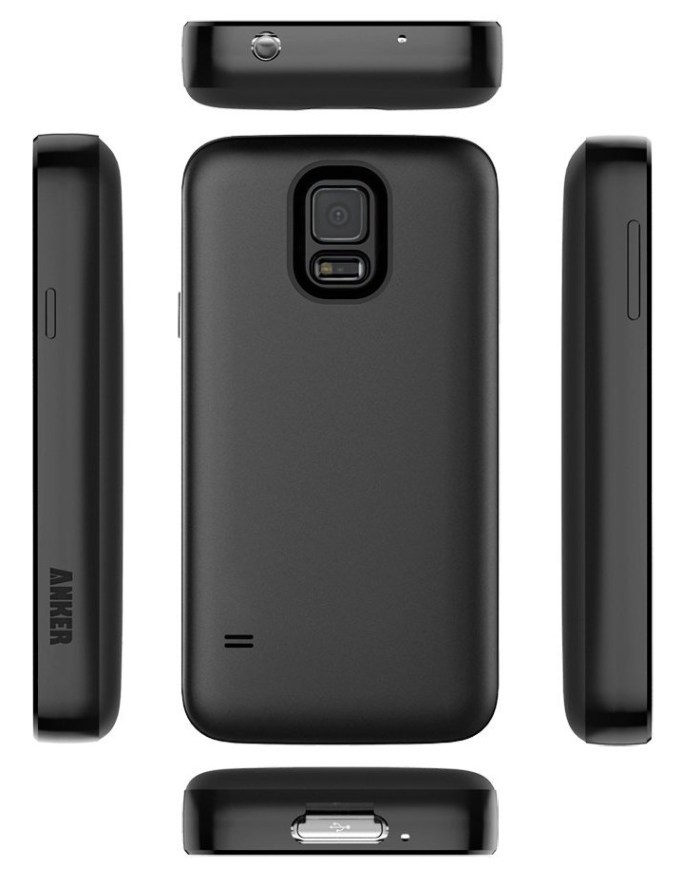
Product Review: Anker 7500mah extended battery for Samsung Galaxy S5

I recently upgraded my phone to a Samsung Galaxy S5, after several years running on a Galaxy SII. While the SII was the best phone I’d had up until that point, there were a number of problems that I had with it, which got especially aggravating toward the end of my time with it. The biggest being ongoing support of the firmware, continually degrading performance over time, necessitating periodic factory resets, and battery life.

Even when brand new, the battery drain on the SII was a serious problem for me, and led to me feeling like I was chained to a power outlet. I’d lose 10% while disconnected from charge for 40 minutes, the length of my commute to work. And yes, I looked in to every conceivable thing you could possible think of to identify causes of drain and do something about them — nothing worked. I bought an extended 3800mah battery for it, which helped a bit, but even so at times I would see the phone draining impressively fast — 1% per minute, on many occasions.

I came to the conclusion that an ideal smartphone should be about an inch thick, and be about 90% battery by weight.

When I went shopping for a new phone, I was really unsure of whether I would want to consider one of the newer generation Samsung Galaxy phones. But ultimately, I selected the Galaxy S5. The non-removable, non-upgradeable battery on the S6 is one of the main reasons why I went with the S5 over the newer model. The other major reason was the lack of a SD card slot on the S6. While looking at extended battery options for the S5, I found that there were a few super-sized batteries offering 5500mah+ — including a 7500mah battery from Anker, and a 8500mah from ZeroLemon.

I went with the Anker for two reasons: the case looked like it would be more comfortable in my pocket, being less bulky if perhaps less armored than the ZeroLemon. And two, the battery was shaped in such a way that it would not block the external speaker, which is an issue with a number of the other extended batteries.

Thankfully, I found that the S5’s battery life on the stock battery wasn’t bad at all, going 10-14 hours on a charge before it got below 20%. That’s almost a full day on the go. But I still wanted to see what it would be like to live completely free of battery anxiety, and this does it for me. Maybe someday they’ll integrate transparent solar cells into the touch screen so that we can charge while using the phone, and at that point a smaller battery might make sense. But I think, minimum, a smartphone with today’s power draw characteristics needs a good 5000mah on tap at a minimum in order to be useful.

With the 7500mah battery from Anker, I am completely satisfied. I have had days where I unplugged at 7am, and didn’t charge it at all throughout the day, used the phone quite a bit, and yet still had a 65% charge by 10pm. Knowing that I don’t have to worry about my battery draining, and can still use my phone, makes me feel like I really have a phone, and not an emergency device to use sparingly if at all. And not needing to stay within 6 feet of a power outlet all the time feels like complete freedom.

anker7500-2 anker7500

It makes the phone heavier and thicker, but these are not a big deal. It’s well worth it to have a phone that I can use all day, and really use, without running the battery critically low in just a few hours. I feel that this should be the standard battery performance for any smartphone. It’s pretty much a must-buy.

The only real downside to the battery is that the way they designed the case, it makes it basically impossible to use the fingerprint reader/heart rate monitor. If you want to use that feature on your phone, you may want to look into a different battery. Samsung makes an OEM extended battery with 3500mah capacity, which, based on the performance I saw from the stock 2800mah battery that came with my phone, is probably adequate for an estimated 16-18 hour day of moderate to heavy phone use. There are some other larger batteries between 3500 and 7500mah from various other manufacturers, but I don’t know how reputable they are, and it’s not uncommon for false, inflated capacity claims from the no-names, so be careful. The Anker, at least, is the real deal. Highly Recommended.

Buy it

Ouya that was

It was announced today that Razer has bought Ouya.

“Razer reportedly plans to continue supporting Ouya’s existing game service for a year.”

“Razer doesn’t seem to be interested in trying to continue Ouya’s original strategy.”

So what does this mean for the users? Razer will continue the Ouya service for another year, and then they are pulling the plug. After that, will an Ouya have any useful purpose? Will it boot? Probably. But you can bet that any updates there might have been for it will not be available any longer. Can users re-install games that they had purchased? It doesn’t sound like it.

Someone will hopefully come up with a solution, a way to back up your Ouya games and run them — at least those titles that do not depend on a live service that they must connect to in order to play at all. Any games that do require a server for the client to access, will probably cease to be playable. Which is a shame. Unless perhaps the services are spun off to some other organization, or released as a product that people can obtained and run on their own hardware. But that seems quite unlikely. What profit would there be in it? The industry has interest only in selling you new product — sorry, services; it’s not fair to call it a “product” anymore when you can’t own what you are paying for — and they have no incentive to compete against what they released a few years ago, even though there might well be a long-tail niche of fans, enthusiasts, and academics who have an interest in keeping it around for amusement or research.

This weekend, I attended the 2015 CCAG Show where gamers, fans, and collectors gathered to exhibit and trade vintage and recent video games, some approaching almost 40 years old. This celebration of living video game history has been going on for 10 years now, and was made possible by the love players have for these games, and the enduring survival of the physical medium into which they were encoded. Will there be anything like this for Games as a Service consoles and mobile devices? It seems very doubtful. Once the vendor no longer wants to support the product, they will shut it down, the lights will die, and the party is over, the attendees left standing around in the dark, shuffling to music that is no longer playing, wondering what it all meant, or if it even happened at all.

Historians such as Jason ScottHenry Lowood, and others engaged in the struggle to preserve the history of the culture and industry of video games can do a great deal when it comes to archiving media and emulation of hardware, but when it comes to service-based business models, it becomes difficult if not impossible to envision how these things can be preserved so that future generations will be able to look back and see what was, and understand how we got here. The users only have access to the client side, and the service side is not only out of their reach, licensed for use but not owned, but it changes and evolves over time.

The ultimate laptop: retro modern ThinkPad

Lenovo started listening to years of ThinkPad fans griping yesterday.

Ars Technica picked up the story, and people are discussing it, really exited about the idea.

Yesterday I talked about what would make the perfect keyboard for my dream laptop.

Today I’ll talk about the features that I’d love to see on a new ThinkPad that harkens back to the best days of the product line.

Screen

  1. 15.4″ (but by all means, produce a full line of different sized ThinkPads with different screen sizes: 11″, 13″, 15″, 17″…)
  2. 16:10 aspect ratio — this is a MUST
  3. 10-bit IPS panel with at least up to 3K resolution
  4. glare-free matte surface, not glossy.
  5. not a touch screen (but I’m ok if it’s a configuration option at purchase)

Chassis

  1. Rugged, metal frame — aluminum, magnesium, or titanium
  2. Rubberized black paint finish
  3. Easy to work on. Repairing/replacing or upgrading the keyboard, RAM, and hard drive should be as easy as they were on the T61p.
  4. RAM slots sufficient to support at least 32GB of RAM
  5. Support ultrabay hard drive carrier
  6. Door/sliding cover for webcam for paranoid folks
  7. Sliding latch to securely hold lid closed
  8. Weight and thickness not primary concern, should not constrain design or compromise durability or features.
  9. Removable battery with sufficient capacity to run laptop for at least 12 hours of heavy, active use, on a charge — 18 hours would be even better. Yeah, a big bulky heavy battery. What good is the ultimate laptop if you can’t use it because it’s out of juice?

Ports

  1. Modern everything. HDMI-out or Display Port out instead of VGA. USB 3.0 slots (at least four of those).
  2. Gigabit ethernet (of course).
  3. Optional for SD card reader slot
  4. Full size slots, nothing proprietary or minimized for space

The Best Laptop Keyboard Yet Devised By Humankind

Laptop ergonomics are always a compromise. If you put in long hours on a laptop, you know how important comfort and usability are to productivity. So getting the best possible ergonomics given the constraints imposed by the design requirements is extremely important.

It seems many hardware design engineers have forgotten this. The quest for thinner, lighter, cheaper seems to have overshadowed comfort and usability, durability and ruggedness. With each passing hardware generation, we see the same refrain: “The new keyboard is not so bad, once you get used to it.” If we have to get used to a “not-so-bad” keyboard with every generation, doesn’t that suggest that they’re getting worse over time?

And yet, the keyboard is the one component of a laptop that you have the least configuration options for. There are no choices, no upgrades; the keyboard is the keyboard, and you get whatever the manufacturer designed. That means it’s all the more critical that manufacturers give their customers the best possible keyboard.

What if manufacturers gave us keyboards that didn’t take “getting used to”, but felt fantastically comfortable from the moment you used them?

Without a doubt, the best keyboard I have ever seen or used on a laptop has been the keyboard of my Lenovo ThinkPad T61p. It’s no secret, and everyone who’s used one knows how good they are and how far short any other laptop keyboard compares. This keyboard is so good that I’ve continued to use my T61p originally purchased in 2007. After my original T61p died this January, I shopped around looking at the new ThinkPads… and after looking at what was available, I went to eBay and bought myself another T61p.

I won’t be able to do that forever. Already, I feel a need for a machine that can support more than 8GB of RAM, and the new Core i7 CPUs are so much faster than my by-no-means inadequate 2.4GHz Core 2 Duo. And the battery life we see with the current generation of “ultrabooks” in 2015 is impressive.

Will we ever see a return to the keyboards of yore? It wish that it was not in doubt. But I have hope. It appears that Lenovo has finally responded to customer feedback, when this spring they brough back the old style trackpads with physical buttons that had disappeared with the 540 generation. And today, it appears that they are actively soliciting fans of the old ThinkPad brand to ask them what features made the old ThinkPad so legendary. And they updated the X1 Carbon with a more standard keyboard layout in response to complaints and criticism over a senseless radical departure from the norm. Perhaps we’ll glimpse perfection again someday.

To be sure, we will not see a return to greatness if we fail to recognize the things that made the best keyboard of all time so great.

Close to perfection

Behold, The T61p keyboard in all its glory.

T61 keyboard - crop

Let’s take a look at what makes this keyboard so great.

The Good

Full-size keys, spaced the correct distance apart. This makes typing for long periods of time less tiresome, especially for people with larger hands.

Scissor Switch technology allows for longer travel for a laptop keyboard, which is more comfortable than “chiclet” keys. It’s not a full height keyboard like you’d find on a desktop class machine, but it’s very close, giving it a good feel and making it more comfortable again for long typing sessions.

The layout of the non-standard keys is ideal.

It’s important to appreciate how critical the placement of these keys is. Let’s look at them in detail.

A full row of Function Keys, F1-F12. In many newer layouts, this row is eliminated and the F-keys are combined with other keys. This makes compound keystrokes impossible if the F-key needs to be pressed at the same time as the key it is combined with. That’s probably pretty rare, but it is still nice to have this row of keys to themselves. I think keyboard designers eliminated this row in order to make room for larger trackpads. I don’t like large trackpads for a few reasons, which we’ll get into in the Trackpad section.

A full row of real F-keys

The arrow key cluster. Most importantly, the arrow keys are all full-sized, and arranged in an inverted “T” formation. Many keyboards save a key by squishing the up and down arrow keys into the space of a single key, putting all four arrow keys in a line, but this space savings comes at a cost of making up and down half sized, and makes controlling games that use the arrow keys way harder.

The other important thing about this cluster is the presence of the “Previous page” and “Next Page” buttons to either side of the up arrow. These are often replaced with “Pg Up and Pg Dn” buttons. I like “previous” and “next” here because it makes navigating web pages with this cluster very fast. I don’t have to move my fingers at all and I can scroll and hit the Back button or Forward button in a web browser. It’s very convenient, and I really miss it whenever I have to use a keyboard that doesn’t have this layout.Arrow Keys + Fwd-Bck buttons = awesome document & browser navigationThe Insert|Delete|Home|End|PgUp|PgDn cluster. I really like these where they are, too. Being at the top right corner of the keyboard makes them simple to find by feel, without having to take my eyes off the screen. The Home/End and PgUp /PgDn pairs go very naturally together for navigating text documents with the keyboard. These navigational shortcuts are a great alternative to scrolling with the mouse wheel, and for moving the cursor when text editing. Insert and Delete change the cursor mode, Home and End can take you to the beginning or end of a line of text, while Ctrl+Home or Ctrl+End will take you to the beginning or end of the entire document. Pg Up and Pg Dn are better for scrolling than the mouse is, moving an entire window height up or down at a single keystroke. Clustering them in this arrangement makes for very intuitive and quick document navigation using the cursor, and enables me to be much more productive when working in text files or reading than if I have to move my hand to the trackpad or mouse.

Insert-Delete-Home-End-PgUp-PgDn = logical layout perfection

Print Screen, Scroll Lock, and Pause/Break. These don’t get used a whole lot by most people. I use Print Screen all the time, to make screen captures, but the other two hardly at all. Putting them up here out of the way works. Having Print Screen at the left edge of this 3-key row makes it easy to find by touch, without having to take my eyes off the screen to look for it.

PrScnSysRq-ScrLkNumLock-PauseBreak

While we’re looking at this group, note the power button (the circular button at left.) While not part of the keyboard, proper, I will remark that I find the power button difficult to find by touch. If I’m fumbling around in the dark, it’s easier to find the ThinkVantage key, which feels more like I’d expect the power button to feel like. So, one thing I could recommend is change the power button, locating it closer to a corner of the keyboard, and give it a shape and feel more befitting a power button.

Keycaps shape and feel

All the keys are just shaped right. These keycaps are close to what old classic IBM Selectric typewriters and Model M keyboards felt like, and those were some of the best keyboards ever manufactured.
The best type of keys for a laptop

The Enter key isn’t L-shaped, which leaves room for the \| key directly above. The \| key doesn’t really have a reason to be larger, but it keeps symmetry with the Tab key on the left side, and helps a touch typist feel this edge of the keyboard. Esc isn’t double-sized, as it is on some later model Lenovo keyboards — I think making it the size of the Ctrl key, slightly larger than the standard key, would make it easier to find by touch. Ctrl is slightly wider than standard, but I like that, although it would be better if Ctrl were in the position occupied by Fn, where it belongs. Backspace is another good key to be larger than standard, as it is used frequently by most, and this makes it easier to find in the top right corner.

Sufficient Key Rollover: a must have

[Updated 4/20/2016]:

Keyboard Rollover is is the ability of a computer keyboard to correctly handle several simultaneous keystrokes. N-Key Rollover (NKRO) is the ideal — it means that the keyboard can handle any number of simultaneously key presses. At a minimum, a good keyboard should have 6KRO.

I’ve mostly used high-end keyboards that have high #KRO or NKRO, and have only recently encountered a keyboard with low KRO. Unfortunately this happens to be my new ThinkPad P50, which is a great laptop in most respects, but it has a paltry 2KRO. If I’m holding down more than two keys simultaneously, a third key press often is not detected (depending on which keys are down). This makes the keyboard hopelessly unsuited to gaming, and as a game developer, this is really not acceptable.

You can test the key rollover of a keyboard by holding down both shift keys simultaneously and then trying to type the alphabet. If any letters don’t type, your keyboard has low rollover. This should never, ever happen on a high end machine. Or any machine, really.

Nitpicks

Fn/Ctrl positions should be swapped

On most keyboards, the Fn key is nested between the Ctrl and Windows keys. On the T61p layout, this is reversed. There’s no reason for it, and it’s one of the most common complaints about the T61 layout. In fact, there are even third party firmware hacks to remap the keys into their preferred positions: Ctrl outside, Fn to the right. In the ideal keyboard layout, Ctrl should go first.

switch Ctrl-Fn positions

Controversial items

10-Key or not 10-Key?

Many widescreen laptops have 10-key numeric keypads these days, much like 104-key extended keyboards on desktop keyboards. This forces the main keyboard off-center with respect to the screen, which means that the users arms and hands will have to skew left of center the majority of the time when typing, which feels awkward. Unless you do a large amount of numeric data entry, a 10-key is not necessary or recommended for a laptop keyboard. Thankfully, at least the trackpad is still centered under the space bar, keeping it directly between the hands on most laptops with extended keyboards that incorporate a 10-key pad. But typing on the QWERTY keyboard, with the hands offset relative to the screen is less comfortable. The extra keys of the 10-key pad also add to the complexity and cost of the keyboard.

Most users don’t need a 10-key pad, and can live without. Unless you’re doing heavy numerical data entry, they don’t add of value. You could always buy a USB 10-key pad as a peripheral and use that if you needed one. Before laptops started sporting 10-key pads on the right of the main keyboard, they used to use the Fn key to use the right half of the keyboard as a sort of slanted 10-key option. I’ve never bothered switching into this mode, and don’t miss a 10-key pad. So, my preference would be for a regular QWERTY keyboard, without a 10-key pad, and the QWERTY keyboard and touchpad centered in the laptop chassis.

Still, some people will want 10-key pads and others will not — and the number who do not is not inconsequential. But the number of people who can’t live without a 10-key pad is much smaller than the number of people who don’t need it. I would prefer not to have a 10-key pad in my ideal laptop. This would be a good item to make a configuration option at time of purchase. Modular, interchangeable keyboard FRUs that have or omit the 10-key pad would be a great solution.

Are backlit keyboards necessary?

Again, some people like them, and some don’t. Illuminated keys can be helpful when typing in low light conditions, but they drain battery and add cost to manufacturing, although probably not significantly, since most laptop keyboards seem to use them these days. Most of them have an option to turn the backlight off and adjust the brightness level, and this seems to be the best choice. It enables everyone to be happy. On laptops which have this feature, I just turn the backlight off, and touch type as always.

Which type of switches is the best?

This is subjective and people can have their own opinions. These days, there are three main types of keyboard: chiclet, dome, and buckling spring. The T61p keyboard had scissor switches, a type of dome switch. These work and feel great — almost as great as buckling spring switches.

I find “chiclet” keys to be fine, I can use a chiclet keyboard without issue, and type fast and with confidence with them, but I still prefer the feel of the scissor switch keys on my T61p. Some people prefer the lower travel of the chiclet key, and manufacturers favor them today because they enable thinner designs. But I really prefer the feel of the full travel key caps, and the scissor switches in the T61p keyboard give a closer approximation of the way full travel keyboards feel.

The biggest disadvantage of the scissor-switch keyboard is that it adds to the overall thickness of the machine, but I strongly believe that thinness is a highly overrated feature. With ultra-thin laptops approaching 0.5 inches, there’s not much room left to go thinner. And there’s plenty of leeway for making a laptop a little thicker to allow for a better keyboard. The T61p is 1.4 inches thick, and I’ve never once felt that it was an issue. I would much rather have a thicker, heavier laptop that is more rugged and will hold up to years of heavy use, and has more room for expansion or battery, than a ultra thin and light laptop.

Really, though, on the switch type, I could go either way. Chiclet keys feel nice enough to be acceptable, but for longer typing sessions I truly like the additional travel and resistance of scissor switches. This is an area where making it a configurable option would be nice. A modular, interchangeable FRU keyboard offering the user their choice of chiclet or scissor switch keys would make everyone happy.

Pointing devices

While we’re at it, let’s look at the pointing devices. First, we have the TrackPoint stick, the red nub. People who use them really love them, and they don’t get in the way of people who don’t. They’re a vital part of the ThinkPad brand and image, and should never be done away with.

Next, we have the touchpad. The touchpad is surrounded top and bottom with physical mouse buttons. these are well designed and robust. Positioning them top and bottom is important because it makes them reachable to both the thumb and fingers, regardless of where the hand is positioned on the keyboard or touchpad, which makes using the buttons quicker. We also see a middle mouse button, which is useful for Linux users.

As for the touchpad itself, it is only 2.25 x 1.5 inches — which is ideal. Newer generation notebook PCs have trended toward larger touchpads, which allows for greater precision with reduced sensitivity, but I really prefer this smaller size. It is not so large that it becomes an easy target for accidental bumps by the palm of the hand. I never accidentally brushed the touchpad on my T61p with the heel or palm of my hand when typing, which means I never accidentally click the mouse cursor away from where I’m typing. I do have this problem on many newer model laptop keyboards, and it is a constant, huge annoyance.

The touchpad is not multi-touch capable, and that would be a good improvement to add to this design. It does have scroll regions at the right and bottom edge, which are configurable.

The UltraNav touchpad driver is excellent, with lots of configuration options to get it to work just how the user prefers.

T61-trackpad

What else?

It’d be great if keyboards were more interchangeable in laptops, across different models and manufacturers. It would take a great effort of the industry to standardize the top half of all laptop chassis to have the same shape and size space for a keyboard. But there’s no reason it couldn’t happen, if manufacturers decided to standardize, or if a manufacturer decided standardize within their own product lines. The computer industry has standardized on other things, so why not a standard to allow laptop keyboards to be more interchangeable between different models and makers? This could spur innovation in improving keyboards, since users would not longer be stuck with whatever the designers engineered for a particular model — users would be free to upgrade and choose the style and layout that they prefer.

I doubt that it will happen on an industry-wide level, that we’ll be able to buy generic commodity keyboards from any maker and put it into any laptop, there’s just too much inertia for it. But it could happen if the industry decided it wanted to. Even if it didn’t want to, manufactures could standardize more within their own model lines, and offer a greater variety of keycap types and layouts to satisfy the preferences of different customers. I expect the main reasons they don’t do so have to do with cost, and to some extent integration and aesthetics issues. But these are not insurmountable issues.

For me, a better keyboard is still well worth paying some premium for. A keyboard that doesn’t feel cramped, has a familiar layout for ALL keys, and a satisfying feel, for me, would be something I’d easily pay another $50-100 for, if it were an option to purchase an upgraded keyboard that was just the way I like it.

Mouse Double Click extension for GameMaker Studio provides double-click detection

Mouse Double Click is an Extension that provides two new GML functions, mouse_doubleclick_init() and mouse_check_doubleclick() 

Written in pure GML, these new functions round out the built-in Mouse functions, allowing you to easily check for double-click events.

Mouse Doubleclick demo.

To use it, first call the mouse_doubleclick_init() function in the Create event for the object that will be handling click actions. This creates an instance variable used to perform timing checks for the double-click, like so:

//Create Event:
mouse_doubleclick_init();

In a Step or Mouse event, call mouse_check_doubleclick(), passing in parameters for the mouse button to test for, and the doubleclick delay in microseconds (1/1,000,000th of a second).

//Mouse Event
mouse_check_doubleclick(mb_left, 250000); //250000 microseconds = 1/4 of a second

mouse_check_doubleclick() will return true if there were two clicks within the duration specified by the second argument, and false if no double click is detected.

That’s all there is to it.